Microsoft 365 E3 versus E5: how to right-size without losing protection
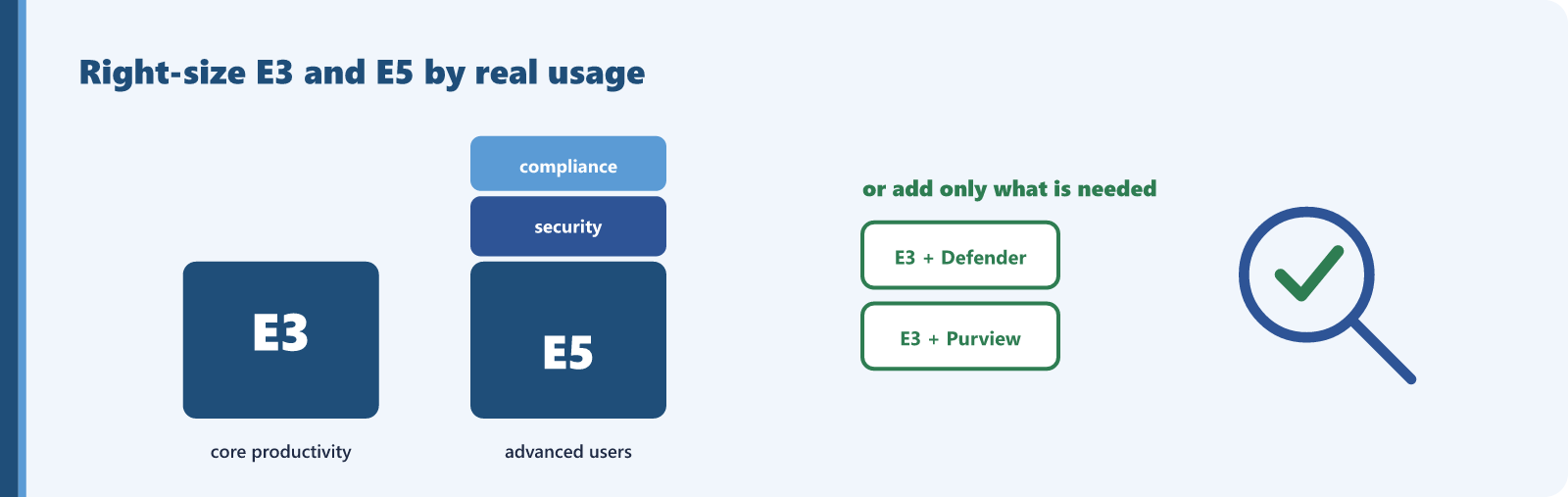
E5 is a strong product, and for users who genuinely use its advanced security and compliance services it is good value. Putting all staff on E5 by default is a different matter. For users who only need email, Office apps, and Teams, the extra capability is paid for and never touched, and buying E5 across an entire organization to cover a minority of advanced users is a common, expensive default.
Before you upgrade to E5 or cut back, see what you pay for that nobody uses. Sentsai's free, read-only scan flags E3 and E5 seats that are unassigned or held by disabled or inactive accounts, plus add-ons your suite already includes. Under 300 users, it also checks which E3 seats Business Premium could cover. The free scan shows the savings total; the itemized report is paid.
Needs a one-time approval of read-only access from an administrator who can approve apps. Not an admin? Email this to yours.
The path many teams miss is that the choice is not only E3 or E5. Microsoft publishes add-on suites that sit on top of E3: the Microsoft Defender Suite (formerly Microsoft 365 E5 Security) and the Microsoft Purview Suite (formerly Microsoft 365 E5 Compliance). Each requires Microsoft 365 E3 as the base, or Office 365 E3 with Enterprise Mobility + Security E3. They let you add the higher-grade security or compliance stack to only the users who need it, on top of an E3 foundation, rather than moving everyone to full E5.
The documented services E5 adds over E3 include Power BI Pro, Teams Phone Standard, Audio Conferencing, the higher Defender for Endpoint and Defender for Office 365 plans, Defender for Identity, Defender for Cloud Apps, Microsoft Entra ID Plan 2, Microsoft Purview Information Protection (formerly Azure Information Protection Plan 2), and the E5 information protection, insider risk, and eDiscovery and audit capabilities. If a user touches none of those, they do not need E5.
Deployment scenarios and auditing
Any organization on blanket E5 should look hardest at frontline and task workers, shared-function staff, and teams whose tools do not overlap with the E5 security and compliance set. To right-size with evidence:
- Pull usage reports for the headline E5 services: Power BI, Teams Phone, the Defender workloads, and the Purview compliance tools.
- Identify E5 users with no activity in any E5-only service over a meaningful period.
- Group them, and decide who could move to E3 and who needs only one add-on suite, Defender or Purview, rather than full E5.
- Confirm no E5-only feature is quietly relied on, such as a compliance retention or audit policy, before downgrading.
When this does not apply
Do not downgrade a user who actually uses E5 capability. If they rely on advanced eDiscovery, insider risk management, the higher Defender tiers, or Teams Phone, E5 or the correct add-on suite is the right license, and moving them to E3 would break something. The goal is precision, not a blanket cut in the other direction. If usage shows the feature is in use, the recommendation is to keep it.
The price gap between E5 and the right smaller configuration, multiplied by the over-licensed user count. Because Microsoft supports adding only Defender or only Purview onto E3, that saving is often captured without giving up the specific protection a user needs.
Check your own E3 and E5 seats
The free scan totals the savings it finds, including unassigned, inactive and duplicated E3 and E5 licenses. It is read-only, and the itemized report is paid.
Needs a one-time approval of read-only access from an administrator who can approve apps. Not an admin? Email this to yours.
Questions? support@sentsai.com