Two licensing rules that quietly cost or save you money: multiplexing and dual use rights
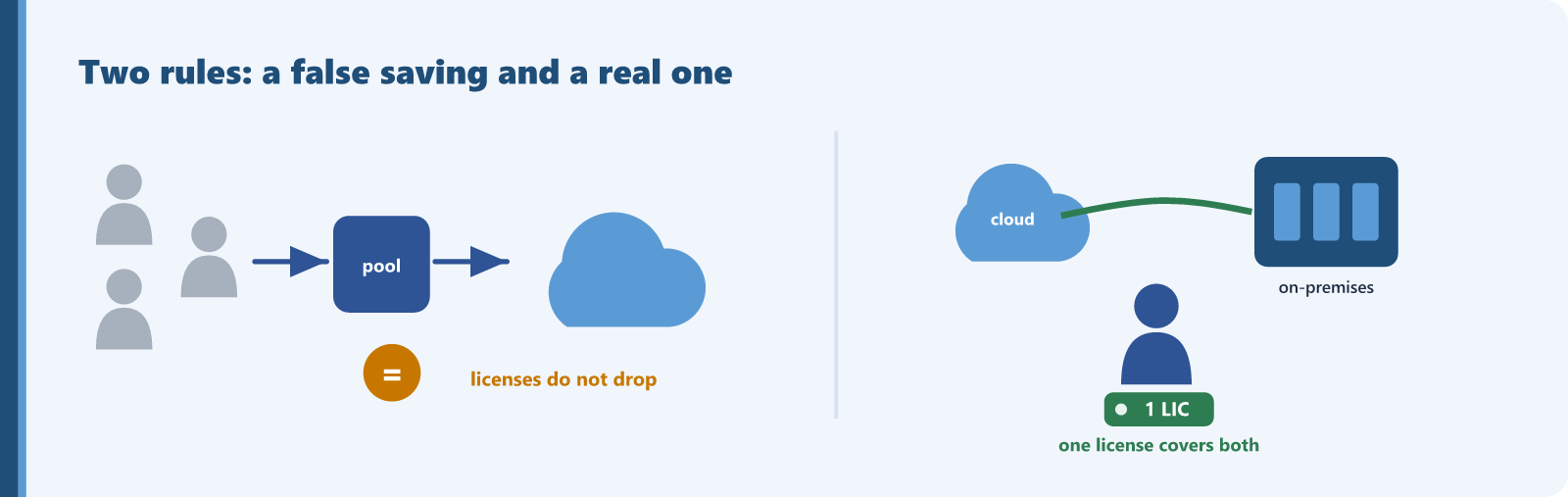
Some licensing ideas sound like savings and are not. Others sound like extra cost and are not. Two rules sit at the center of this confusion across Microsoft 365 and Dynamics 365.
Multiplexing is the saving that is not real. Multiplexing is using middleware, a portal, a service account, or any pooling layer between your people and a Microsoft product so that fewer accounts appear to touch it. The tempting conclusion is that you then need fewer licenses. Microsoft closes that door directly. The Microsoft 365 guidance states that pooling or rerouting access does not reduce the number of licenses you need. The Dynamics 365 guide says the same: multiplexing does not reduce the required number of licenses, and any user or device that accesses Dynamics 365 directly or indirectly, including through a pooling device or an API, must be properly licensed. The number of tiers between the user and the product does not change the count. If anyone has proposed a custom front end as a way to cut license counts, that saving will not survive an audit.
Dual use rights are the cost that is not real. Teams running Dynamics 365 in the cloud sometimes also keep an on-premises deployment, for migration, dev and test, or a workload that must stay local. The fear is that on-premises means buying client access licenses all over again. For the Dynamics application itself, that fear is misplaced. The Dynamics 365 Licensing Guide describes dual use rights: users with a Dynamics 365 license have rights equivalent to a CAL for accessing the equivalent on-premises workload, and any server license the on-premises deployment would otherwise need is included with the Dynamics 365 license. Properly licensed cloud users do not buy additional Dynamics CALs to reach the matching on-premises application.
Deployment scenarios and auditing
On multiplexing, any team that has built or considered an integration layer, a portal, or a service-account pattern in front of Microsoft 365 or Dynamics 365 is exposed. On dual use rights, the relevant case is any organization running Dynamics 365 in the cloud and on-premises at the same time. To check both:
- Map every path into Microsoft 365 and Dynamics 365, including portals, integrations, service accounts, and APIs, and confirm the humans and devices behind each path are licensed. Indirect access still counts.
- For parallel cloud and on-premises Dynamics deployments, confirm cloud-licensed users rely on dual use rights for the on-premises application rather than holding duplicate Dynamics CALs you could drop.
- Check the Dynamics 365 dual use rights mapping in the Product Terms to match each online license to its on-premises equivalent.
Where the rules bite the other way
Dual use rights have real limits. The Dynamics guide is clear that the rights are non-perpetual and expire when the cloud subscription ends, and that licenses for all supporting servers, such as Windows Server and its CALs, must still be obtained separately. Dual use rights cover the Dynamics application, not the platform underneath it. So the saving is real for Dynamics CALs and does not extend to the Windows Server licensing around the deployment. On multiplexing, there is no friendly exception beyond the manual re-keying case. If people benefit from the product, they need licenses.
Multiplexing produces no saving, and the value of understanding it is avoiding a false one and the true-up that follows. Dual use rights produce a saving equal to the duplicate Dynamics CALs you can retire for cloud-licensed users who also reach the on-premises application, while the surrounding server licenses stay in place.
Find this kind of waste in your own tenant
Sentsai scans your Microsoft 365 tenant in minutes, read-only. The free scan shows what the waste costs you; the itemized report is paid.
Needs a one-time approval of read-only access from an administrator who can approve apps. Not an admin? Email this to yours.
Questions? support@sentsai.com