Dynamics 365 base and attach licensing: stop paying full price for every app
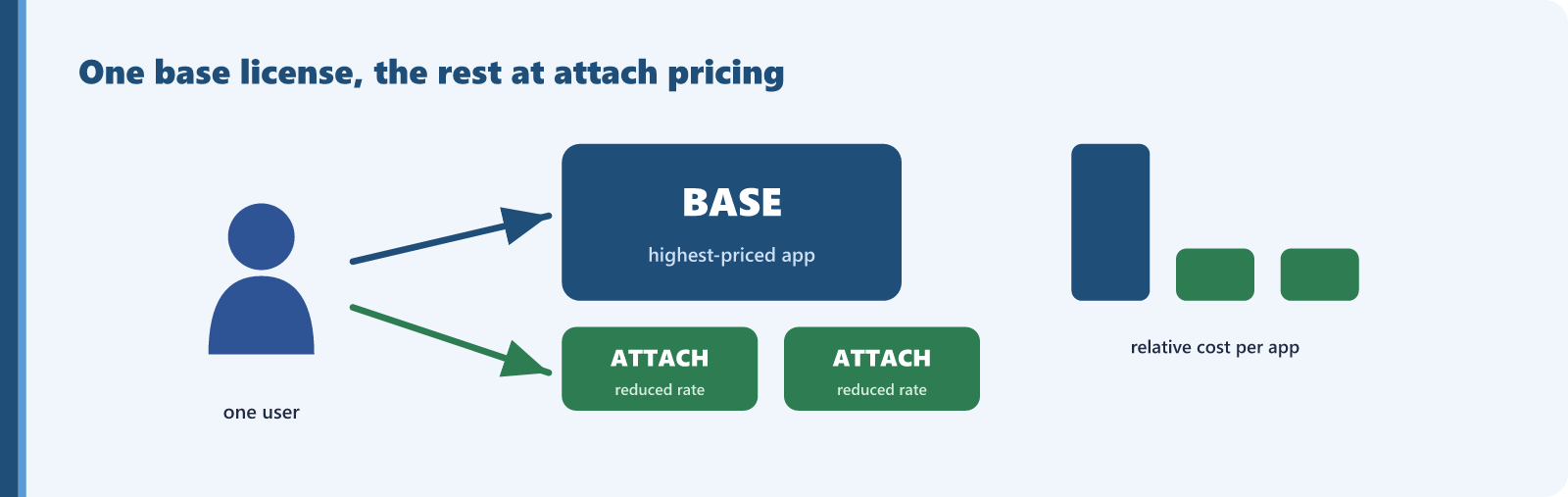
Here is a Dynamics 365 rule that pays for itself the moment you apply it. When one person needs more than one Dynamics 365 application, you do not buy two full licenses. You buy one base license and add the others as attach licenses, at a reduced supplemental rate.
The mechanics, from Microsoft’s Dynamics 365 Licensing Guide, are straightforward:
- Base license: when one user needs multiple Dynamics 365 apps, the first license must be the highest priced of them. Every full-access user has exactly one base license.
- Attach license: each additional app for that same user is licensed at the lower attach rate, and attach licenses can only be assigned to a user who already holds a qualifying base.
The guide is explicit that base and attach licenses are identical in their core capabilities and differ only in price. You are not buying a weaker product with attach. You are buying the same app for the same user at the additional-app rate.
A documented example
As a structural example based on illustrative commercial baselines, a user whose base license is Business Central Premium can add eligible applications such as Customer Service Enterprise, Field Service, or Sales Enterprise as attach licenses at a reduced supplemental rate. The second app comes in at the specialized attach rate instead of requiring a separate, full-priced base license. When nobody configures attach pricing, that second app is bought as another full base license, which is exactly the overpayment to eliminate.
Deployment scenarios and auditing
Any organization running more than one Dynamics 365 application, where some users work across them, is exposed. Salespeople who also touch Customer Service, operations staff who span Finance and Supply Chain, and service teams who use Field Service alongside another app are typical multi-app users. To check:
- List your Dynamics 365 users and the apps each is licensed for.
- Find users holding two or more full base licenses.
- For each, check whether their combination qualifies for attach pricing, where one app is the base and the others attach.
- Confirm the highest-priced app is set as the base, since the base must be the highest priced license.
When this does not apply
Attach pricing applies only to a qualifying base-and-attach combination, and only the published pairings qualify. Not every pair of apps is eligible, so check the qualifying list rather than assume. A user who genuinely needs only one Dynamics 365 app has no attach to add and is already correctly licensed.
For each multi-app user wrongly on two full licenses, the saving is the difference between a second full license and the attach rate for that app. Count your eligible multi-app users, apply the gap between full and attach for their combinations, and confirm current rates with Microsoft to produce a defensible annual figure.
Find this kind of waste in your own tenant
Sentsai scans your Microsoft 365 tenant in minutes, read-only. The free scan shows what the waste costs you; the itemized report is paid.
Needs a one-time approval of read-only access from an administrator who can approve apps. Not an admin? Email this to yours.
Questions? support@sentsai.com